


Your PM Kisan installment hasn’t arrived. Or you completed FRUITS registration months ago but the portal still shows “eKYC Pending.” Or the OTP simply never reaches your phone because your Aadhaar-linked mobile number is years out of date. These are the situations Karnataka farmers actually face when dealing with the FRUITS bank login system—and they’re the reason this guide exists.
FRUITS (Farmer Registration and Unified Beneficiary Information System) is Karnataka’s centralized farmer database, developed by NIC under the Department of Agriculture. Every registered farmer receives a unique FID (Farmer Identification Number), which now functions as a mandatory gateway for PM Kisan installments, crop insurance, MSP procurement, and milk incentives. Without a linked FID and completed eKYC, benefits stall.
Discover More About:👇
PM Kisan Portal – Login & Registration Guide
Ekikrit Portal – Kisan Registration Guide
What the FRUITS Portal Actually Does
Before FRUITS, farmers submitted the same set of documents—Aadhaar, land records, bank passbook—to the agriculture department, then again to horticulture, then sericulture, then animal husbandry. Each department maintained its own register. If your name was spelled differently in one office’s file, you started over.
FRUITS consolidates this. It pulls data from Aadhaar for identity verification, from Bhoomi for land records, from the ration card database for household details, and from NPCI for Aadhaar-seeded bank account validation. Your FID then becomes the single reference point departments use to confirm eligibility and route payments through Direct Benefit Transfer (DBT).
For PM Kisan, FRUITS acts as Karnataka’s backend. The state pushes verified farmer data to the central PM Kisan system. If your FID isn’t linked or your eKYC is incomplete, that push fails—and your installment is held.
How to Access the FRUITS Portal
Two portals serve different purposes. fruits.karnataka.gov.in handles registration, profile updates, and general farmer services. fruitspmk.karnataka.gov.in is dedicated to PM Kisan status checks, FID lookups, and beneficiary verification.
For citizen login on the main portal:
- Open the portal and locate “Citizen Login” on the homepage.
- Enter your registered mobile number or Aadhaar number.
- Wait for the OTP—it goes to the mobile number linked to your Aadhaar, not necessarily the one you’re holding.
- Enter the OTP and proceed to your dashboard.
A pitfall worth knowing: If your Aadhaar-linked mobile is outdated or disconnected, the OTP will never arrive. You’ll need to update your mobile number at an Aadhaar Seva Kendra or enrolment centre before you can log in. This is the single most common reason farmers get stuck at the login screen.
First-time users need to complete “Citizen Registration.” The form asks for personal details (name, Aadhaar number, date of birth, gender), residence information (district, taluk, village), land ownership details, bank account information, and document uploads. Registration is a one-time process—once your FID generates, you don’t register again.
Checking PM Kisan Status on FRUITS
Karnataka farmers can verify their PM Kisan status using either their Aadhaar number or PMKID (PM Kisan ID).
By Aadhaar Number
- Open fruitspmk.karnataka.gov.in.
- Navigate to “Check Status” or “MIS Report.”
- Enter your 12-digit Aadhaar number carefully—a single wrong digit returns “No Record Found,” which farmers often misread as “not registered.”
- Submit. Your status screen should display your FID, registration status, payment history, and the last installment credited.
By PMKID
- Select the “PMKID” option on the same portal.
- Enter your PM Kisan ID.
- Submit to view beneficiary status.
What the status messages typically mean:
- Active / Payment Done: Details verified, payment processed.
- FID Not Linked: Your FRUITS FID hasn’t been mapped to the central PM Kisan system. Visit a Raitha Samparka Kendra with your Aadhaar and Pahani (RTC).
- eKYC Pending: Aadhaar-based KYC incomplete. Installments are generally blocked until this finishes.
- Land Records Mismatch: Name on your land record differs from your Aadhaar name. A Bhoomi correction is usually needed.
Searching Your FID by Aadhaar
Your FID begins with “FID” and unlocks every FRUITS-linked benefit. If you registered but lost the number, retrieve it using your Aadhaar.
- Open the direct FID search page:
fruitspmk.karnataka.gov.in/MISReport/GetDetailsByAadhaar.aspx - Enter your Aadhaar number.
- Click Search.
- Your farmer details—FID and PMKID—should appear.
If nothing appears, you likely haven’t registered yet. Registration can be completed at a Raitha Samparka Kendra, Grama One centre, Bapuji Seva Kendra, or Common Service Centre (CSC).
Another pitfall: The portal sometimes times out during peak usage—typically at the start of a payment cycle. If the page hangs after you submit, wait a few minutes and try again rather than refreshing repeatedly, which can lock your session.
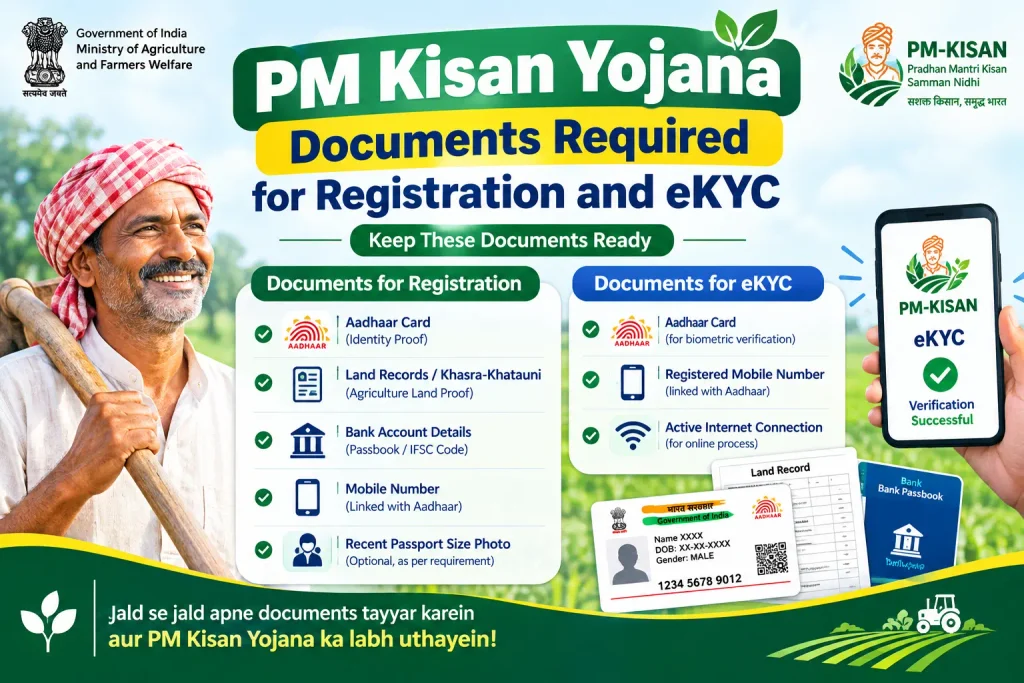
Documents Required for Registration and eKYC
Keep these ready before you start:
- Aadhaar card — primary identity document. Your mobile number must be linked to Aadhaar for OTP verification.
- Land record — RTC (Record of Rights, Tenancy and Crops) or Pahani showing ownership.
- Bank passbook — for recording account details for DBT payments.
- Mobile number — preferably the Aadhaar-linked one.
- Caste and income certificates — may be requested depending on the scheme.
For eKYC, authentication happens through Aadhaar OTP verification or biometric verification at a designated centre. As per current guidelines, eKYC is mandatory for PM Kisan beneficiaries in Karnataka, and incomplete eKYC can halt payments.
Discover More About:👇
CKYC Login – Step by Step Guide
Common Mistakes That Block Benefits
Assuming registration equals linking. A FRUITS FID alone doesn’t guarantee PM Kisan benefits. The FID must be explicitly linked to the central system. Karnataka authorities have noted that many farmers completed FRUITS registration but never finished the KYC and digital consent step required for central recognition. Check your status on the FRUITS PM Kisan portal to confirm.
Using a mobile number not linked to Aadhaar. OTP verification for both login and eKYC requires the Aadhaar-registered mobile. If yours is outdated, visit an Aadhaar Seva Kendra first.
Name mismatches between Aadhaar and land records. FRUITS validates your name against Bhoomi and Aadhaar. Spelling differences or initials-versus-full-name discrepancies can fail validation. Resolve these at the Bhoomi office before registering.
Treating eKYC as optional. Government notices have indicated eKYC is mandatory. Registration alone is not sufficient.
Frequently Asked Questions
How do I search for my FRUITS PM Kisan FID number by Aadhaar?
Enter your Aadhaar number on the FRUITS PM Kisan portal’s FID search page. If your registration is complete, the result shows your FID and PMKID. This helps if you registered earlier but lost the number.
Is there a fee for FRUITS registration or FID generation?
FRUITS registration and FID generation are described as free services. However, fees and procedures can change—verify current details on the official FRUITS portal or at a Raitha Samparka Kendra.
Can I complete FRUITS eKYC online?
Some eKYC processes may be available online through Aadhaar OTP verification. For first-time eKYC, visiting a designated centre such as Grama One or Raitha Samparka Kendra with Aadhaar and land documents is often recommended. Availability may vary—check the portal.
What should I do if my PM Kisan status shows “FID Not Linked”?
Visit your nearest Raitha Samparka Kendra or agriculture department office with your Aadhaar and Pahani (RTC). They can initiate the linking process. This is typically free, but confirm locally.
Is FRUITS only for Karnataka farmers?
Yes. FRUITS is a Karnataka state platform. Farmers in other states use their own state databases or the central PM Kisan portal directly.
What is the difference between FID and PMKID?
FID is generated by Karnataka’s FRUITS system. PMKID is the central PM Kisan scheme’s identifier. When your registration is linked, both appear together in status checks.
Closing Thoughts
If your PM Kisan payment is stuck, the fastest path forward is usually a visit to your Raitha Samparka Kendra with Aadhaar and Pahani in hand—not repeated attempts on the portal. And if you’ve just completed eKYC or linking, give the system a few working days to reflect the change before re-checking status; immediate refreshes often show stale data. For anything related to fees, timelines, or procedural changes, the official FRUITS portal and your local agriculture office remain the only reliable sources.

1 Comment
Pingback: PM Kisan Portal – Login & Registration Guide