


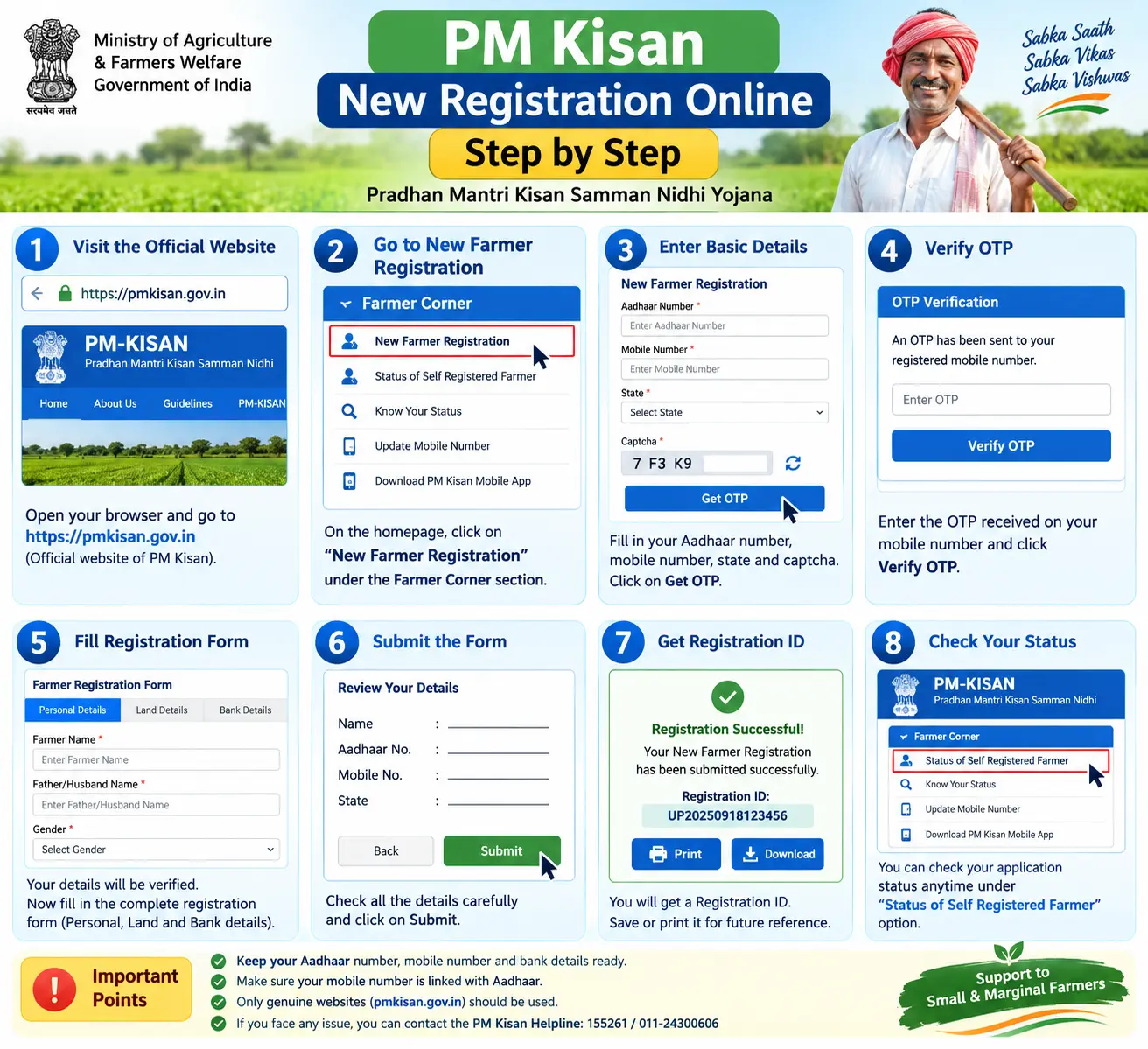
To register for PM-KISAN online, eligible farmers can use the official PM-KISAN portal and select New Farmer Registration. You need your Aadhaar number, mobile number, state details, land records and bank account information. After completing Aadhaar authentication and the required application details, submit the form and save your registration/reference details for future status checks.
This guide explains PM Kisan eligibility, required documents, the online registration process, e-KYC, CSC registration, common mistakes and how to check your registration number.
What Is PM-KISAN and Who Can Apply?
PM-KISAN is a central sector scheme that pays eligible landholding farmer families ₹6,000 a year, in three instalments of ₹2,000, transferred straight to a bank account. A “farmer family” here means husband, wife, and minor children — and only one registration is permitted per family, so if your spouse has already enrolled, a second application will not be accepted.
Eligibility rests on one core condition: cultivable agricultural land must stand in your name or your family’s name in state revenue records. Both rural and urban landholders can apply. Certain categories are excluded, including institutional landholders, serving and retired government employees (Group D/MTS staff excepted), professionals such as doctors and engineers, income-tax payers, and pensioners drawing ₹10,000 or more a month. If you fall in any of these groups, registering will not help. Check your eligibility on the official PM-KISAN portal before you spend time on the form.For the latest eligibility rules and registration requirements, always verify the information on the official PM-KISAN website before submitting an application.
Discover More About:👇
Farmer Registration & Farmer ID Registration Guide
UP Farmer Registration Check by Aadhaar: A Complete Guide for Uttar Pradesh Farmers
Documents Required for PM Kisan Registration
Assemble these before you open the portal. Half-filled applications are the most common reason people have to start over.
- Aadhaar card – required for farmer identification and Aadhaar authentication during registration. Keep your Aadhaar details available and use an active mobile number for authentication and communication where required by the registration process. If your Aadhaar mobile number is outdated, get it updated at an Aadhaar Seva Kendra or Aadhaar Enrolment/Update Centre first.
- Land ownership records – the document varies by state: Khatauni, Khasra, Jamabandi, or Patta. It must show cultivable land registered in your name or your family’s name.
- Bank account details – an active savings account, ideally Aadhaar-seeded, with the account number and IFSC code ready. Keep your correct bank account number and IFSC code ready. Make sure the bank account details provided in the application are accurate and able to receive DBT payments.
- Registered mobile number – the one linked to your Aadhaar, for OTPs during registration and e-KYC.
If your name is misspelt in land records or your Aadhaar mobile number is dead, fix that first. It is faster than submitting an application that will be rejected at verification.
Step-by-Step Guide for PM Kisan New Registration Online
You can register yourself at pmkisan.gov.in or through the PM-KISAN mobile app. The steps below follow the portal.
Step 1: Open the Portal and Find the Farmers Corner
Go to the official PM-KISAN website. On the homepage, locate the “Farmers Corner” menu. Everything a farmer needs — new registration, status check, e-KYC — sits inside this one section.
Step 2: Select New Farmer Registration
Click “New Farmer Registration.” A form opens asking for your Aadhaar number and state.
Step 3: Choose Rural or Urban
Select “Rural Farmer Registration” or “Urban Farmer Registration” depending on where your land is located, not where you currently live.
Step 4: Enter Aadhaar and Captcha
Type your Aadhaar number, select your state, and enter the captcha exactly as shown. Pitfall: if the captcha fails repeatedly, refresh the page rather than re-typing endlessly — the session may have expired.
Step 5: Fill Personal, Land, and Bank Details
Complete every mandatory field:
- Name exactly as printed on your Aadhaar
- Date of birth and registered mobile number
- Land details matching your ownership records
- Bank account number and IFSC code
Pitfall: Check your account number and IFSC carefully before submitting the application. Incorrect bank details can cause payment-related problems or require correction later.Read the passbook, not a memory of it.
Step 6: Complete e-KYC
e-KYC is required for PM-KISAN beneficiaries. Depending on the available authentication method, it can be completed through Aadhaar-based OTP, biometric authentication or face authentication through the PM-KISAN mobile app. Follow the authentication option currently available on the official PM-KISAN portal or app.
Pitfall: If authentication does not work, check your Aadhaar and mobile details and try again later. If the problem continues, use an available CSC or official support channel for assistance.
Step 7: Submit and Save the Reference Number
Review everything once more, submit, and write down the reference number shown on screen. Screenshot it as well.
Your application then moves to local revenue officers and onward to the State Nodal Officer. Only after that verification does your name appear on the portal and instalments begin.
Registering Through a Common Service Centre (CSC)
If the online form keeps failing, or your Aadhaar linking is unresolved, a nearby Common Service Centre can file the application for you. Carry your Aadhaar, land documents, bank passbook, and a passport-sized photograph. The operator will fill the form and hand you an acknowledgment slip or registration number. CSCs charge a service fee, so ask the rate before handing over documents. Keep the receipt.
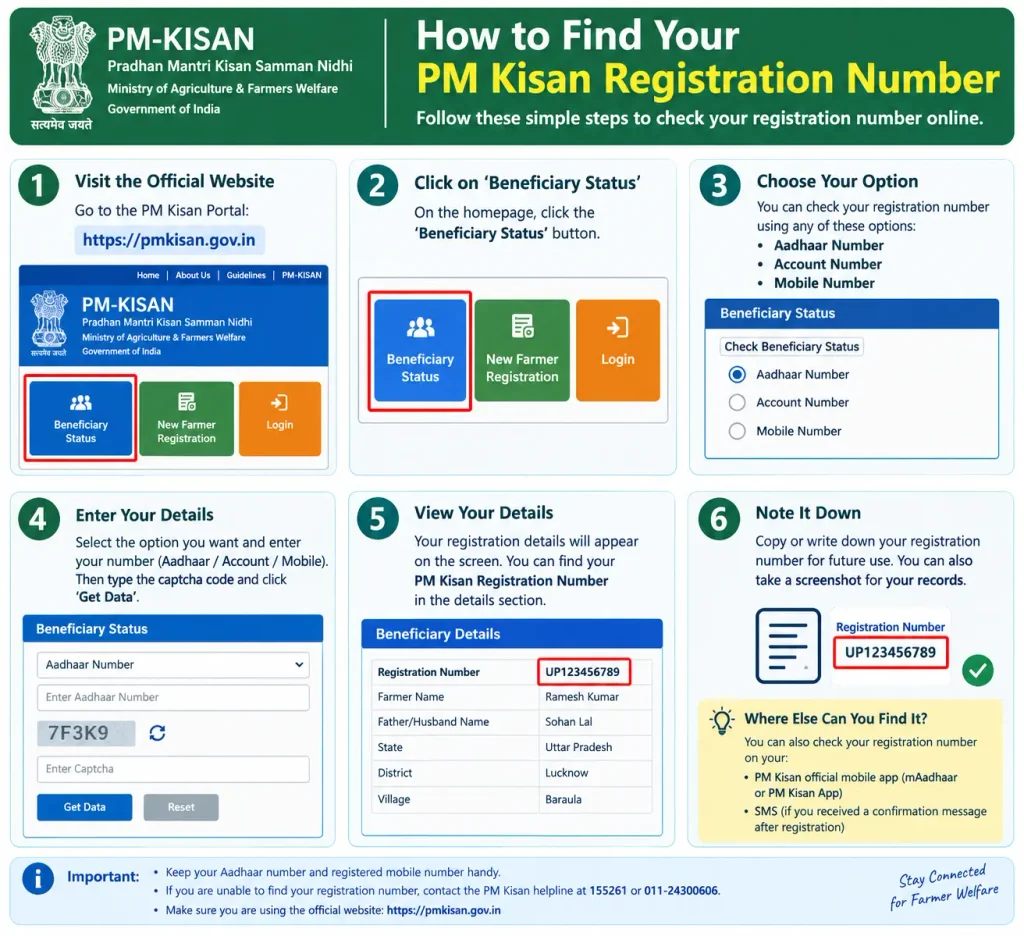
How to Find Your PM Kisan Registration Number
Forgot your registration number? Visit the PM-KISAN portal, open the Farmers Corner, click “Know Your Status,” and then “Know Your Registration No.” Enter your Aadhaar number or registered mobile number. After OTP verification, the number appears on screen. Save it somewhere permanent — you will need it for every future status check.
Common Mistakes to Avoid
These four issues block more payments than any other cause:
- Bank account or DBT-related issue – Incorrect bank details, account issues or required bank/Aadhaar seeding-related problems can affect payment processing. Check your beneficiary and payment status and contact the bank or concerned authority if a correction is required.Visit your bank branch or a CSC to complete it.
- e-KYC left incomplete – Instalments are withheld until e-KYC is done.
- Name mismatch in land records – Even a small spelling variation can fail verification. Correct it at the local tehsil or revenue office.
- Mobile or authentication issue – If you do not receive an OTP or Aadhaar authentication fails, check the mobile and Aadhaar details entered during the process and try again. If the problem continues, use an official assistance channel. Update the number at an Aadhaar centre before applying.
Discover More About:👇
Kisan Registration Bihar / State Wise Guide
Frequently Asked Questions (FAQs)
What is the PM Kisan registration number and where can I find it?
It is the unique ID assigned when you enrol. Retrieve it under “Know Your Registration No.” in the Farmers Corner using your Aadhaar number or registered mobile number.
Can I register for PM KISAN if I don’t own land?
PM-KISAN is intended for eligible landholding farmer families whose cultivable landholding is recorded in the applicable land records. Farmers should check the current official eligibility rules before applying.
Is e-KYC mandatory for PM Kisan registration?
Yes, for all beneficiaries including new applicants. Complete it by OTP, biometric, or face authentication on the PM-KISAN app.
Can I register for PM Kisan through the mobile app?
Yes. The app supports self-registration, status tracking, and face-based e-KYC. It is available on major app stores.
What should I do if my PM Kisan payment is not credited?
Check “Know Your Status” on the portal first. The usual culprits are incomplete e-KYC, unseeded bank accounts, land record mismatches, or verification still pending with the state. Fix the specific issue rather than reapplying.
Can I update my details after registration?
Yes — bank account, mobile number, and corrected land details can all be updated through the portal or at a CSC.
Final Thoughts
After submitting your PM-KISAN registration, check the application status through the official portal. If the application is pending or rejected, check the reason shown in your status details and follow the required correction or verification process. Always confirm the latest eligibility, registration requirements and scheme updates on the official PM-KISAN website before taking action.
Last Updated: September, 2026

2 Comments
Pingback: UP Farmer Registration Check
Pingback: Kisan Registration Bihar Online