

Last Verified: September, 2026
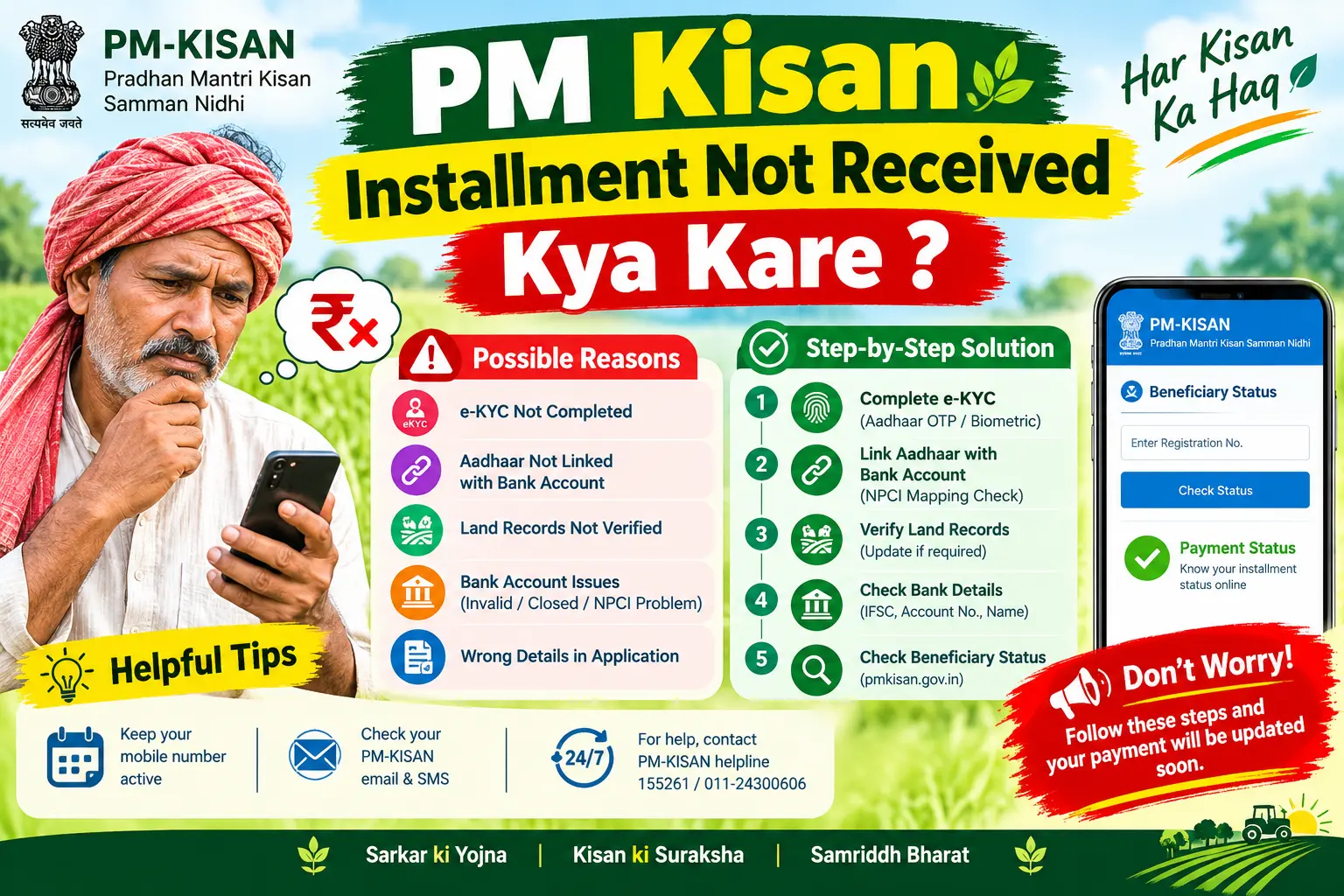
If your PM Kisan installment has not been received, first check your payment status, e-KYC status, bank account details, and Aadhaar-based DBT status on the official PM-KISAN portal. A payment may remain pending or fail because of incomplete e-KYC, incorrect bank details, pending verification, or other beneficiary-record issues. Checking your current status first helps identify where the payment is stuck before you contact your bank, CSC, or PM-KISAN support.
Why Your PM Kisan Installment May Be Delayed
The money doesn’t move as a single transaction from Delhi to your account. It passes through several verification gates, and a payment can stall at any one of them.
Incomplete e-KYC. Electronic Know Your Customer (e-KYC) is a digital identity check that confirms you are who your Aadhaar says you are, using either an OTP sent to your Aadhaar-linked mobile or a face scan. This step is mandatory for beneficiaries, and until it’s done, the system holds your payment. Incomplete e-KYC can prevent a beneficiary’s payment from being processed. Check your current e-KYC status on the official PM-KISAN portal before taking further action.
Aadhaar-bank account mapping. For DBT, your bank account needs to be seeded with your Aadhaar number in the NPCI (National Payments Corporation of India) mapper. Having an Aadhaar card and a bank account is not the same as having them linked for DBT.If Aadhaar-based DBT or bank details are not correctly mapped, the payment may not reach the beneficiary’s bank account. Ask your bank to verify the Aadhaar seeding and DBT status of the account.
Name or record mismatch. Differences in beneficiary, Aadhaar, or bank records can require correction before payment can be processed. Check the details shown in your PM-KISAN and bank records and correct any discrepancy through the appropriate authority.
Discover More About:👇
PM Kisan 23rd Installment Date 2026: Key Details Every Farmer Should Know
Pending land verification. Your state government has to verify your land ownership records before you’re treated as an eligible beneficiary. If that verification is pending, or if there’s a discrepancy in your revenue records, the installment is put on hold at the state level.
How to Check PM Kisan Payment Status
Before you fix anything, find out which of the above is actually blocking you. Guessing wastes trips to the bank.
- Open the official PM-KISAN website (pmkisan.gov.in).
- Go to the Beneficiary Status option, listed under the Farmers Corner section.
- Choose how you want to look yourself up — by Aadhaar number, bank account number, or registered mobile number. Enter the captcha and click Get Data.
- Read the result carefully. You’re looking for two separate things: your e-KYC status and your installment/FTO status. FTO stands for Funds Transfer Order — it’s the instruction that releases money to your bank. Check the payment status and other transaction details shown on the portal. If the payment shows as processed but the amount has not reached your account, contact your bank and PM-KISAN support with the available transaction or beneficiary details.
Step-by-Step: How to Complete Pending e-KYC
If your status check shows e-KYC pending, pick whichever of these three routes fits your situation.
Method 1: OTP on the portal. Go to the e-KYC section on the PM-KISAN portal, enter your Aadhaar number, and request an OTP. The OTP goes to the mobile number registered with Aadhaar — not necessarily the number you use daily. If no OTP arrives, that’s your actual problem: your mobile isn’t linked to Aadhaar, and you’ll need to get that updated at an Aadhaar Seva Kendra before this method will work.
Method 2: Face authentication via app. Download the PM-KISAN app and the Aadhaar Face RD app, log in with your registered mobile number, and scan your face when prompted.Face authentication can provide another e-KYC option where supported by the PM-KISAN app and the required Aadhaar authentication services.Do it in decent lighting and hold the phone steady — a failed scan usually just means poor light, not a rejected identity.
Method 3: Visit a CSC. A Common Service Centre or State Seva Kendra operator can complete biometric e-KYC for you. Carry your Aadhaar card. If you use a CSC for assisted e-KYC, ask the centre about any applicable service charge before completing the service.
What to Do If Your Aadhaar or Bank Details Are Wrong
If the status check points to a mismatch, fix the source record first — correcting it in the PM-KISAN system alone won’t help if Aadhaar and the bank still disagree.
For Aadhaar corrections, use the official UIDAI portal (uidai.gov.in) or visit an Aadhaar Seva Kendra. For Aadhaar-related corrections, use the official UIDAI website or visit an authorised Aadhaar centre. The documents and process depend on the type of update required.
If your bank details are incorrect, contact the appropriate PM-KISAN/CSC channel and your bank to confirm the correct account details and Aadhaar-based DBT status.
You can also do this at a CSC. If your Aadhaar seeding itself is missing at the bank, that’s a branch visit — ask specifically for Aadhaar seeding for DBT, not just a general KYC update.
How to Raise a Complaint If the Problem Persists
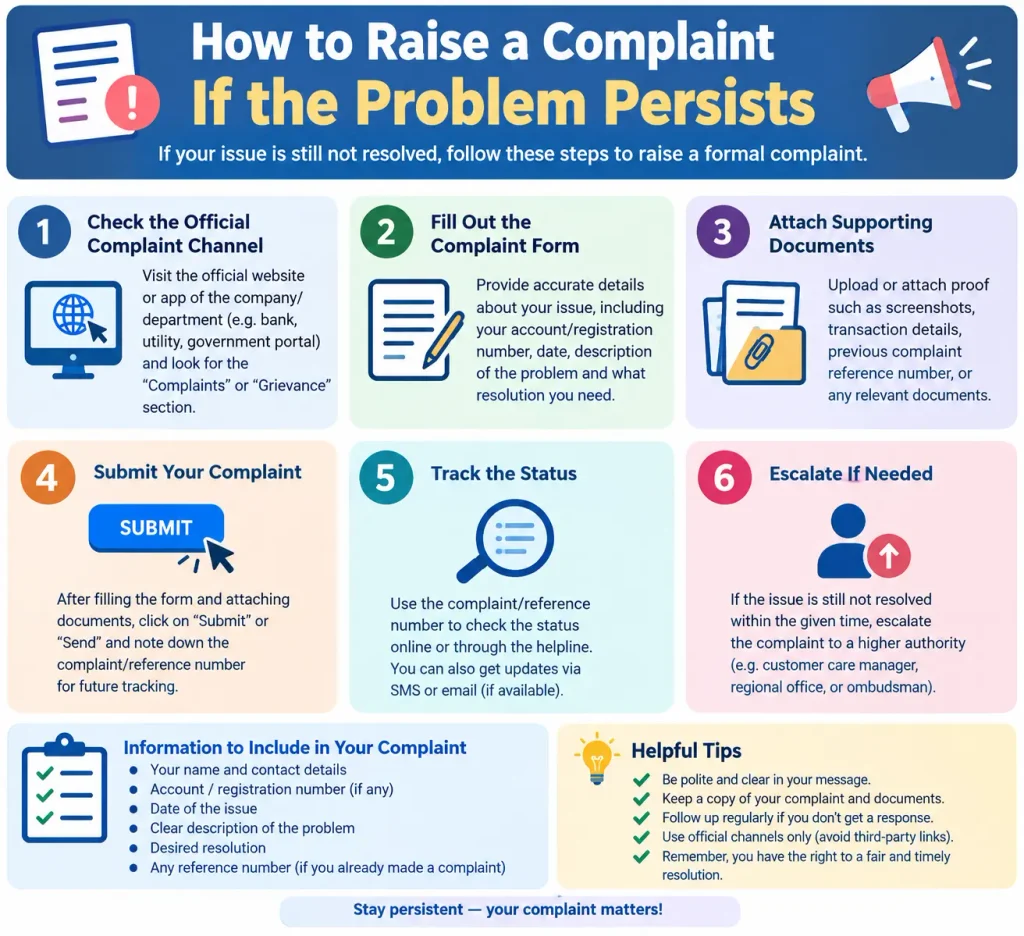
If e-KYC is complete, bank details are correct, land verification is clear, and the installment still hasn’t arrived, escalate it formally.
Register your issue on the PM-KISAN Grievance Portal with your registration details and a clear description of the problem, then use the portal to track the response. You can also call the PM-KISAN helpline at 155261 or 011-24300606. Keep your PM-KISAN registration or beneficiary details available when contacting support so your issue can be explained clearly.
Discover More About:👇
PM Kisan 22nd Installment Date: Release, Status Check & What to Do If Not Received
PM Kisan Next Installment Date Kab Aayegi
Common Mistakes to Avoid
Not checking e-KYC status. Before contacting the bank or filing a complaint, verify whether your e-KYC is complete on the official PM-KISAN portal.
Assuming your Aadhaar is already linked for DBT. Using Aadhaar as ID at the bank counter is not the same as DBT seeding. Ask the branch explicitly.
Trusting WhatsApp forwards for installment dates. Dates and eligibility news circulate fast and wrong. Verify on the official portal.
Leaving stale details in place. Changed your bank branch, or corrected your name spelling anywhere? Update it in the PM-KISAN system rather than waiting for the next payment to fail.
Frequently Asked Questions (FAQs)
1. Will I get two installments at once if I missed the previous one?
A missed installment is not automatically guaranteed to be paid immediately after a correction. Check your current payment status on the official PM-KISAN portal and follow up if the pending payment does not appear after processing.
2.Why is my PM Kisan installment showing as pending?
A pending payment can be related to beneficiary verification, e-KYC, bank or DBT details, or other processing issues. Check the payment and beneficiary status on the official PM-KISAN portal first.
3. Can I complete my PM Kisan e-KYC for free?
You can complete e-KYC through the available self-service options on the official PM-KISAN system. If you use assisted services such as a CSC, ask the centre about any applicable charges.
4. My name matches on Aadhaar and my bank account, but the payment still failed. Why?
If your Aadhaar and bank details appear correct but the payment has not been credited, ask your bank to verify whether the account is active and correctly enabled for Aadhaar-based DBT. Also check the payment details shown on the PM-KISAN portal.
5. How can I contact PM Kisan for help?
Call 155261 or 011-24300606, or file a complaint through the official PM-KISAN Grievance Portal.
Closing Thoughts
If your PM Kisan installment has not been received, first check your payment and beneficiary status on the official PM-KISAN portal. If the status shows an issue, correct the relevant e-KYC, bank, Aadhaar, or verification details. If the payment remains unresolved after the required correction, contact PM-KISAN support or submit a grievance with your beneficiary details.

3 Comments
Pingback: PM Kisan 24th Installment Date 2026
Pingback: PM Kisan 22nd Installment Date 2026
Pingback: PM Kisan Next Installment Date: Kab Aayegi?