


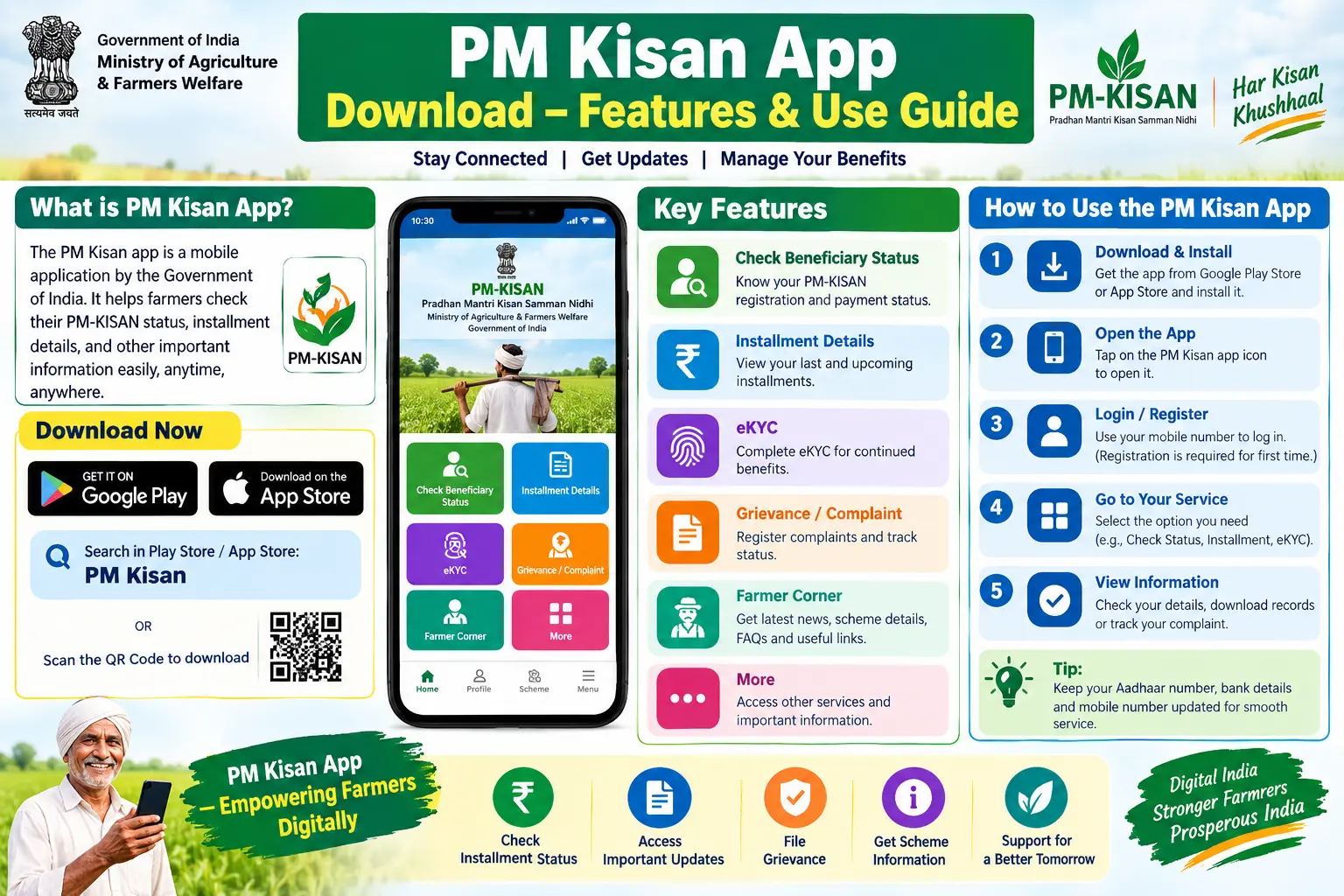
Every instalment cycle, thousands of farmers discover the same problem: their PM-KISAN payment hasn’t arrived, and the reason is almost always a pending e-KYC. Worse, many of them can’t complete that e-KYC the usual way, because their mobile number isn’t linked to Aadhaar, so the OTP never arrives. The PM Kisan app was built partly to solve exactly this deadlock. This guide covers what the app does, how to download the official version, how to complete face-based e-KYC from home, and the mistakes that cause most failed attempts.
What the PM Kisan App Actually Does
The PM Kisan app is the official mobile application for the Pradhan Mantri Kisan Samman Nidhi scheme, developed by the National Informatics Centre (NIC). Under the scheme, eligible landholding farmer families receive ₹6,000 per year in three instalments of ₹2,000, credited directly to their bank accounts.
The app is not just a status-checking tool. It handles four practical tasks:
- Face authentication e-KYC — introduced in June 2023, making PM-KISAN the first government benefit scheme to use face scanning for e-KYC
- Self-registration for farmers not yet enrolled in the scheme
- Benefit status checks — whether an instalment is credited, pending, or blocked
- Assisting others — a farmer can complete e-KYC for up to 100 other farmers; registered state government officials can do so for up to 500
That fourth point matters more than it sounds. In villages where most farmers share the same problem — no Aadhaar-linked mobile number — one person with the app can unblock an entire neighbourhood.
Discover More About:👇
PM Kisan Eligibility Criteria 2026
PM Kisan Yojana FAQ – Har Sawaal Ka Jawab
Why Face Authentication Changed Things
Before the face scan feature, e-KYC meant one of two routes: an OTP sent to your Aadhaar-linked mobile number, or biometric verification at a Common Service Centre (CSC). Both have failure points. OTPs don’t arrive if your number was never linked to Aadhaar, or if you’ve changed numbers since enrolment. CSC visits cost time and travel, and queues build up near instalment deadlines.
Face authentication removes both dependencies. The app scans your face, matches it against your Aadhaar records, and completes verification on the spot. No OTP, no fingerprint reader, no travel.
One detail worth knowing: the face scan doesn’t run inside the PM Kisan app alone. It works through a companion app called Aadhaar Face RD, which you’ll also need to install. The PM Kisan app calls on it when you begin the scan.
Downloading the Official App
Fake and clone apps are a genuine problem here, so verify the developer before installing anything.
- Open the Google Play Store.
- Search for “PMKISAN GoI”.
- Confirm the developer is the National Informatics Centre (NIC), Government of India. The app is hosted under NIC’s e-Gov Mobile App Account.
- Install the app.
- Separately search for and install Aadhaar Face RD — you’ll need it for the face scan step.
If an app asks for payment, or the developer name is anything other than NIC, close it and start over.
Completing e-KYC Through the App
Here’s the sequence as it generally works, along with the points where people usually get stuck.
- Open the PM Kisan app and log in using your registered mobile number or Aadhaar number, plus your Beneficiary ID.
- Go to the e-KYC section and select the face authentication option.
- Read and accept the digital consent for face scanning. The scan cannot proceed without it.
- Position your face in the frame. Use even, front-facing light. A window behind you will darken your face and cause a failed match; so will a strong overhead bulb casting shadows.
- Let Aadhaar Face RD complete the scan. Hold still until it confirms.
- Wait for verification against your Aadhaar records.
Pitfalls to watch for:
- Aadhaar Face RD not installed. The scan will stall or error out. Install it before you start, not midway.
- Beneficiary ID entered incorrectly. This is a common reason for login failure. If you don’t have it handy, it can be retrieved through the PM-KISAN portal using your Aadhaar or registered mobile number.
- App timeout during the scan. Weak connectivity mid-scan forces a restart. Move to a spot with stable internet before beginning.
- Assuming OTP-based e-KYC is gone. It isn’t. If your mobile number is linked to Aadhaar and you’d rather use OTP, that route remains available on the portal and app.
Documents You’ll Typically Need
For new registration through the app, keep these ready:
- Aadhaar number, for identity verification and authentication
- Bank account details, for receiving instalments
- Land records, as required by your state’s verification process
- A mobile number for receiving OTP during login or registration
For face authentication e-KYC, nothing is uploaded. No documents, no photos of papers. Verification happens against your existing Aadhaar record, which is why the face match has to be clean.
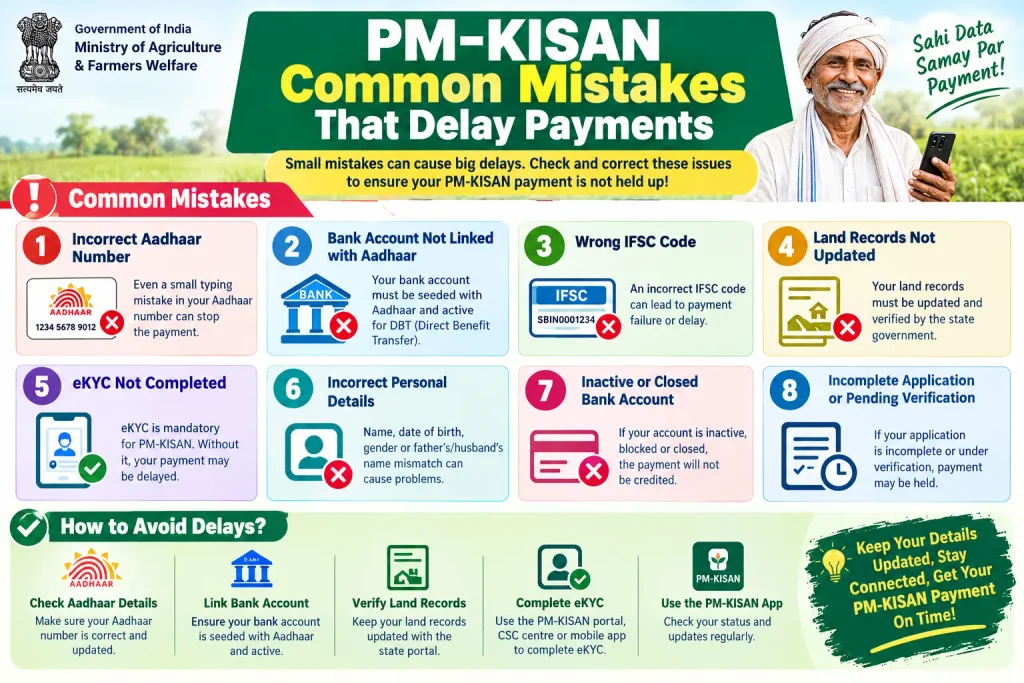
Common Mistakes That Delay Payments
Downloading a lookalike app. Search results sometimes surface unofficial apps with similar names. Check the developer every time.
Skipping e-KYC entirely. e-KYC is mandatory for instalment release. If it’s pending, payments are withheld — no amount of follow-up with the bank will fix that.
Scanning in poor light. The single most common cause of repeated face-match failures. Step outside or face a window during daylight.
Using a mobile number that isn’t registered with PM-KISAN. Login depends on the number tied to your account, which may differ from your Aadhaar-linked number.
Expecting the app to work offline. Status checks and verification both need connectivity. The camera works offline; the verification doesn’t.
Frequently Asked Questions
Is the PM Kisan app free?
Yes. The official PMKISAN GoI app is free on the Google Play Store, as is Aadhaar Face RD.
Can I complete e-KYC if my mobile number isn’t linked to Aadhaar?
Yes — this is precisely the gap face authentication was introduced to close. The scan replaces both OTP and fingerprint verification, so an unlinked mobile number is no longer a blocker.
Can I register as a new farmer through the app?
Yes. The app supports self-registration. You enter your Aadhaar details and other required information, and the concerned state government authority then verifies the submission.
How many farmers can I assist with e-KYC?
A farmer using the app can help up to 100 other farmers in their neighbourhood. Registered state government officials can assist up to 500.
What is the PM Kisan Samman Nidhi app used for?
It’s the same application — the official PM-KISAN mobile app. Its main uses are self-registration, checking benefit transfer status, and completing e-KYC through face authentication, along with general scheme and eligibility information.
Where should I verify current scheme details?
Rules, fees, and procedures change periodically. Check the official PM-KISAN portal or the Google Play listing for PMKISAN GoI for the current position. NIC’s privacy policy for the app is published on the official PM-KISAN website.
A Closing Note That Saves a Second Trip
If your e-KYC goes through, don’t expect the instalment to appear the same day. Verification and payment processing run on separate cycles, so a gap of days or even weeks between a successful e-KYC and the credit is normal. The useful move is to check your beneficiary status in the app a few days after the scan confirms, rather than refreshing it hourly.
And if the face scan keeps failing despite good lighting and a steady hand, don’t keep retrying indefinitely. The CSC biometric route still exists, and a single visit there will settle what repeated app attempts cannot.

1 Comment
Pingback: PM Kisan Eligibility Criteria 2026: Check Who Is Eligible